description: The iOS 26 tab bar in Compose: a selection that becomes a lens you can drag and throw, with motion fitted to iOS recordings.
Tab bar
GlassTabBar combines calibrated material with authored interaction dynamics. Its Legacy
presets preserve existing behavior; GlassTabBarStyle.V3() selects Astra's deforming lens.
The bar and tab anchors stay fixed while selection moves through the lens. See
generic interaction for shared primitives, gesture ownership and the
remaining distinction between the pose renderer and standalone controls.
// Anywhere inside the app's LiquidGlassTheme { … }
Box {
    Content()

    GlassTabBar(
        itemCount = tabs.size,
        selectedIndex = selected,
        onSelected = { selected = it },
        modifier = Modifier
            .align(Alignment.BottomCenter)
            .padding(horizontal = 14.dp)
            .shadow(15.dp, RoundedCornerShape(percent = 50), clip = false),
    ) { index, isSelected ->
        TabLabel(tabs[index], color = if (isSelected) accent else resting)
    }
}
Two rules for the item slot, both because the row is drawn twice — once on the bar, once
inside the lens — and the two copies must line up to the pixel where the lens crosses them:
change only colour between selected = false and selected = true, and do not put your own
click handling on it (the bar owns the gesture and calls onSelected).
Put the shadow on the bar's modifier with clip = false. The held lens is taller than the bar.
The bar needs a LiquidGlassTheme above it, which supplies what it refracts; it takes no state
(the state parameter was removed on 18 October). Without a theme it draws its fallback and logs
one warning. Its default style is GlassTabBarStyle.Calm(dark) in the theme's appearance.
Current Calm selector
GlassTabBarStyle.Calm(dark = true) uses the pose controller. It couples projected area and
spine length so short taps become rounder and longer trips flatten. Adjacent travel uses a
slower authored rate, blending to the existing rate for longer trips. Tap deformation can
extend beyond the resting bar; this does not grant held-gesture ownership. Off-axis drag
strain belongs to the whole navigation bar, whose layout and hit targets stay anchored.
Dark Calm's development tap appearance also fades the inset pigment and emphasizes selected
ink during travel. Projected area and stretch along the travel axis drive that appearance;
pigment recovers gradually when both subside. These are authored response parameters calibrated
against the original short/long tap sequences, not recovered Apple mechanics. Its held refraction
band, rim and whole-bar lift retain their separate
response. Use tapTintFade = 0f and tapSelectedScale = 1f to disable those two additions.
Light Calm uses them too since 17 October (the light recording shows the same transit); historical presets retain these defaults. See the API reference
for the field contract and current research for the measured
comparisons, authored choices and remaining limitations.
Since 13 October, dark Calm's moving selector also shows the lens optics (tapOptics) while its
pigment keeps its measured fade, a thrown lens stays formed until it settles, and wall landings
stay flat against the end. Since 14 October a fast landing presses into the bar's end and the
pill narrows briefly from behind before widening back, as in iOS: after the lift its trailing edge
travels on for about 0.3 s and passes its rest by about 40 px, scored on every wall landing of the
reference recording, and a still-formed lens presses past the bar's end. The moving lens draws the
content under its caps out toward the rim (GlassStyle.rimMirrorGain). Since pass 12 a held
lens dragged quickly widens and flattens at constant area (GlassPoseSpec.heldTravelStrain),
reaching about 0.75 of the bar's height at iOS's fast reversals; a quick flick releases before the
strain has built, so wall landings keep their shape. Its outline is a thin grey line
(GlassStyle.heldEdgeTone) rather than a white ring, and a tapped selector's fold also bends what
lies under its straight top and bottom. Since pass 13 a held lens sits where the bar's press puts
its tab, as iOS's does, and its inward glow shows only over darker ground (GlassStyle.heldGlowFloor). See the
continuous comparison.
Since 15 October dark Calm's levels are fitted in display colours: the reference recordings are
HDR10, and earlier passes had compared them decoded as if they were sRGB, which raised every dark
level by 10-13 grey levels. The bar rests at 33 and the pill at 10-15 as iOS's do; the earlier
calibration is GlassTabBarStyle.CalmRecordedSpace(). The whole bar lifts for any touch, a tap
included (GlassTabBarStyle.touchLift, off by default and on in dark Calm()): iOS's bar lights
on every touch, and a tap's travelling pill, which shows the bar through it, needs that lift to read
as bright as iOS's. Its resting pill and held lens are clear glass with an offset rather than a
tint, so the page shows through them as through iOS's (the pill darkens black to 10 yet passes an
avatar under it), and page text under the bar is one soft copy (GlassStyle.softDetail) rather than
a grainy, ghosted one.
The owner's device check (18 October)
Six notes from a check on a phone, each compared with the iOS recordings and changed where they agreed:
- Icons on a tap. iOS's tab icons do not move on a tap (an icon the lens does not cross holds within
0.1 px) and follow the bar's growth on a hold (14 px out, 4% larger). Calm now does both
(
itemsFollowBarPress = false); before, every tap slid the icons 7 px and back. - Tap travel. A tapped selector stretches the ink it carries into its rim in transit, as iOS's does (since 26 October: a narrow stretch, rim mirror 0.3 and gain 0.15, that clears before landing).
- Two glasses. The held lens's refraction band is the body's own (
GlassStyle.bodyBandScale1.1 since 26 October; it was 0.3) and its map has no seam, so the bar's edge bends into the rim as a crescent instead of showing as a second capsule. The rim splits colour in proportion to the shift and carries a thin spectral line, both growing with motion (evidence). - The lens's outline. A formed held lens is a squircle, not a capsule:
GlassPoseSpec.heldSquircle(.7 in Calm since 26 October) blends it toward a superellipse with n = 3 (squircleExponent), the shape iOS's lens fits, so its top runs flatter and its shoulders squarer. It grows with the formation, so the resting selector stays a capsule (evidence). - The search button. It follows a held swipe at 0.2 of the finger's travel (was 0.35).
- The lens at the search end. A held lens there joins the button through a neck
(
GlassTabBarAccessory.lensFusion), as iOS's does, instead of stopping short of it. - Text under the bar's ends. iOS's rounded ends lens what lies beyond them: an icon's edge outside
the bar shows ~30 px inside its cap. Calm's bar now does the same at its ends only
(
GlassStyle.capFold), leaving the straight runs alone, where a fold garbled text.
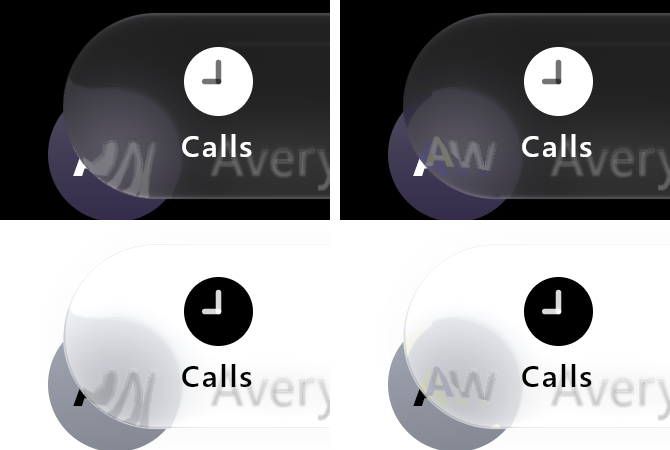
Our renders only, desktop GPU replay at 3x, branch claude/bar-ends: before (left) and with
capFold 1 (right).
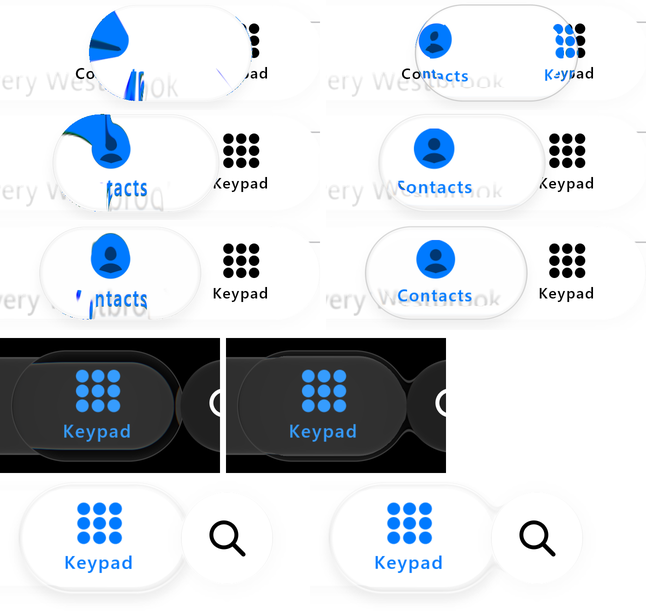
Our renders only, desktop GPU replay at 3x, branch claude/residuals-2. Top: a tap from Keypad to
Contacts, before (left) and after (right). Middle: the dark held lens at the search end, before (left)
and with its 0.3 band and neck (right). Bottom: the light held lens at the search end without and with its neck.
A clearer bar
Calm() is fitted to the Phone app's bar, which passes about 0.59 of the page under it. WhatsApp's
and the App Store's bars on the same device pass about 0.9: over a grey card WhatsApp's bar reads 54
where the Phone material gives 46, while over black both read 32. CalmClear() is dark Calm with
that bar; its resting pill and held lens look through the bar, so they follow it.
GlassTabBar(itemCount = 5, selectedIndex = selected, onSelected = { selected = it },
    style = GlassTabBarStyle.CalmClear().copy(slotWidth = 71.5.dp, pillWidth = 78.dp, pillInset = 4.dp),
    modifier = Modifier.width(348.dp)) { index, isSelected -> Tab(index, isSelected) }
| Display colours, at rest | iOS | CalmClear() |
Calm() |
|---|---|---|---|
| WhatsApp bar / pill over its grey card (23) | 54 / 30 | 53 / 31 | 46 / 24 |
| WhatsApp bar / pill over its chats page (10) | 43 / 19 | 41 / 19 | 38 / 16 |
| App Store plain bar over its card, four gaps | 67 / 65 / 64 / 59 | 66 / 64 / 63 / 58 | 54 / 53 / 52 / 49 |
| Any bar over black | 32 | 32 | 32 |
iOS's chats page has text under the bar, so its 43 sits over slightly more than the bare page our
scene uses. iOS also compresses bright text under that bar: over the App Store's headline its band
reads p50 / p75 69 / 80, the text one faint, soft copy. CalmClear() raises its tint where the page
under it has contrast (legibility 2) and blurs the text under it (7 dp), which leaves a plain card
alone and gives 68 / 79 (18 October; legibility 2.5 at the Phone bar's 1.5 dp gave 67 / 98, with dark
halos round the letters). In light appearance CalmClear() is Calm() with WhatsApp's resting pill. The CanvasKit and .NET ports
take it as clear on the bar material (calmBarMaterial({clear: true}), CalmSelectorMaterial.Bar(..., clear: true)).
Light appearance
Calm(dark = false) is measured on the owner's light-mode recording (17 October; display colours;
Phone keypad page, App Store cards, WhatsApp, Threads):
| Light, at rest | iOS | Calm(dark = false) |
|---|---|---|
| Bar over the page (least squares over seven page levels, 171-245) | 0.58 of the page + 116 | 0.59 + 115 |
| Bar over white | 255 | 255 |
| Bar rim, top / bottom / ends' outermost point | 246 / 242-247 / 178-182 | 246 / 246 / 177-186 |
| Shadow under the bar | 253 | 251-253 |
| Resting pill over white: Phone / WhatsApp / App Store | 245 / 236 / 255 | 245 / 236 / 255 (Calm, CalmClear, App Store scene) |
The bar has the dark Phone bar's slope (white at 0.41 plus 10/255), clearer than the light toolbar the
Photos screenshots measured (0.42 plus 140). Its rim is a darker line and it casts a faint shadow. The
resting pill is clear glass below the bar, by an amount that differs per app: Phone 245 over white
(Calm, 10/255), WhatsApp 236 (CalmClear, 19/255), the App Store's invisible over white (its scene
sets 0; over its cards it reads the card's own level). The held lens is clear glass over the bar with a
light outline (243/255), where dark Calm's is a 65-level line, and it casts a tight shadow offset down
(contactShadowBlur 6 dp, contactShadowOffset 5 dp, contactShadow 0.45, half of it inside the lens):
none above the lens, 242 for ~15 px below it, as iOS's. The bar lifts for any touch, and the tap optics and motion are dark Calm's.
CalmRecordedSpace(dark = false) keeps the light preset this replaced.
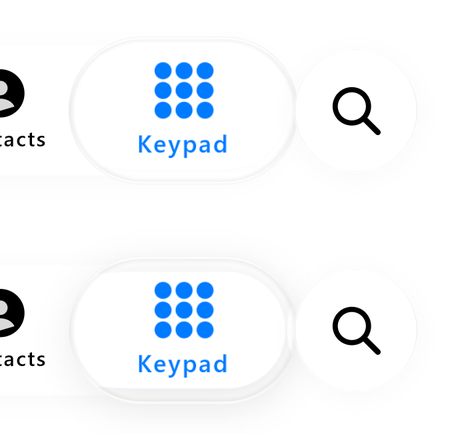
Our renders only: desktop GPU replay at 3x, a 1.2 s hold on Keypad; top without the lens's shadow, bottom
with it (branch claude/residuals).
The bar's rounded ends darken toward their outermost point as iOS's do (GlassStyle.capEdgeShadow 2,
18 October; they read 234-241 before): ~214 at 45 degrees, 177-186 at the end against iOS's 178-182.
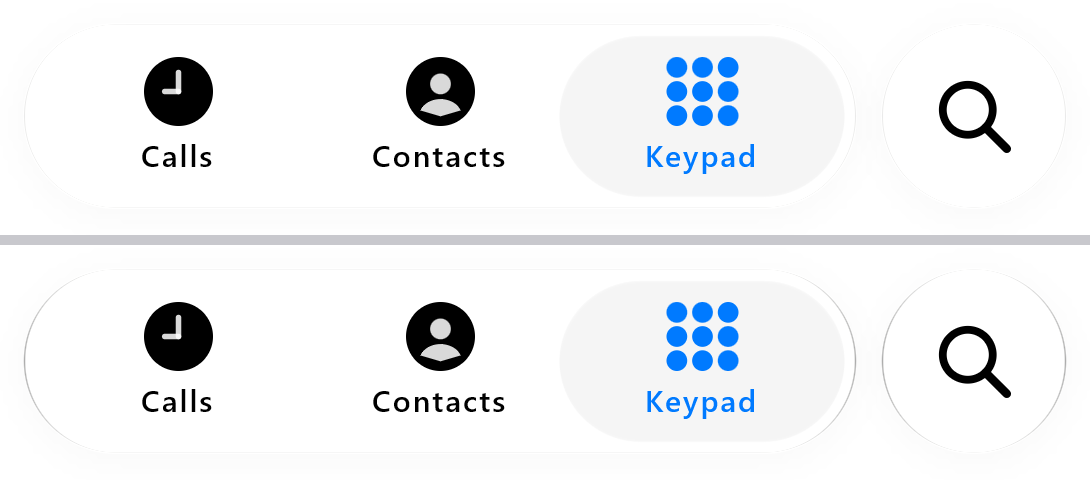
Our renders only: desktop GPU replay at 3x, the light Keypad scene at rest, branch claude/fix-rest; top
capEdgeShadow 0, bottom 2. The search button shares the bar's material, so its sides darken too; that
is not scored separately.
In both appearances iOS draws page text under a tab bar as one soft, legible copy (the owner's
Contacts recording, IMG_7049), which is what softDetail gives the Calm presets; the toolbar role's
sharper high-pass, with its ghost copies, does not apply to tab bars.
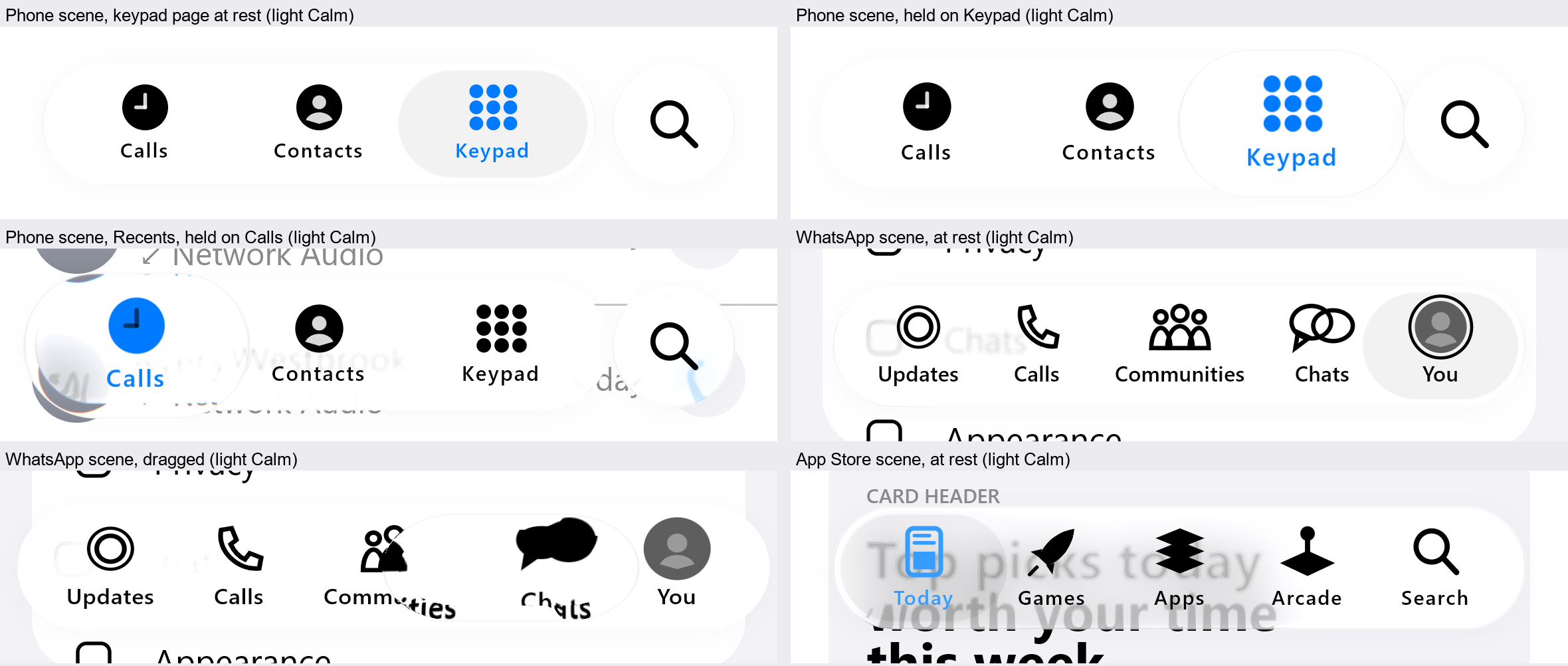
Our renders only: desktop GPU replay at 3x, branch claude/light-and-gaps; the sample's light
palettes (PhonePalette.Light, light = true) are iOS's system colours. The iOS levels are
measurements on the owner's recording, not pixels from it.
Tabs on set slots
By default the tabs share the bar equally inside contentPadding. iOS lays some bars out
differently. WhatsApp's 348 pt bar puts its tabs 71.5 pt apart (its widest item, "Communities"
at 63.3 pt, plus 8 pt), which is wider than a fifth of the bar, and pulls the two end tabs in to
where their pill fits. slotWidth reproduces this:
GlassTabBar(
    itemCount = 5, selectedIndex = selected, onSelected = { selected = it },
    style = GlassTabBarStyle.Calm().copy(slotWidth = 71.5.dp, pillWidth = 78.dp, pillInset = 4.dp),
    modifier = Modifier.width(348.dp),
) { index, isSelected -> Tab(index, isSelected) }
The slots are centred in the bar. If they are wider than the bar allows, an end tab moves in
until its resting pill sits pillInset inside the bar's end. The pill, the held lens, hit
targets, drag and the deforming body all use these centres. Measured on the owner's recording
(17 October), this puts all five of WhatsApp's tab centres within 2 px of iOS's. Slots sized to
each item miss by 13 px. The App Store bar fits the same rule with 64 pt slots and no closing up.
A tap lands on the end tab at 129 px against iOS's 130, and a drag across the bar lands at 915
against 913. The CanvasKit and .NET ports take the same option (calmSelectorBar({slotWidth}), CalmSelectorBar.Create(slotWidth:)).
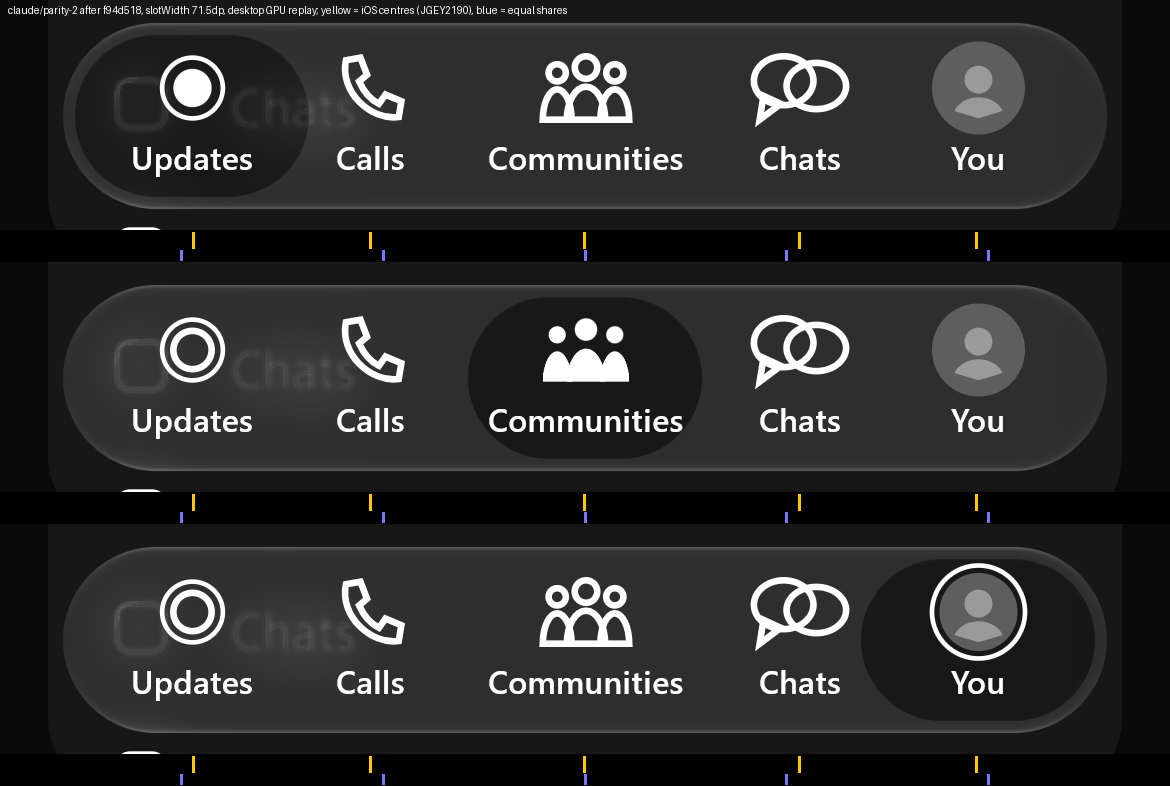
Our renders only: the sample WhatsAppScene with neutral placeholders (a plain disc for the
profile tab), desktop GPU replay at 3x, branch claude/parity-2 after f94d518. Yellow ticks mark
iOS's tab centres measured on the recording; blue ticks mark where equal shares would put them.
Over the same grey card, iOS's bar reads 54 and Calm()'s 46; CalmClear()
reads 53.
A neighbouring control: the search button
iOS 26 places a separate round search button beside the Phone tab bar. It is its own glass, but
while the bar is held, the bar's growth closes the 8 pt gap and the two join through a liquid
neck that parts again on release. Describe the neighbour with trailingAccessory and lay it out
yourself beside the bar:
Box {
    GlassTabBar(
        itemCount = 3, selectedIndex = selected, onSelected = { selected = it },
        style = GlassTabBarStyle.Calm(),
        trailingAccessory = GlassTabBarAccessory(size = 62.dp, gap = 8.dp),
        modifier = Modifier.offset(x = 21.dp).width(278.dp),
    ) { index, isSelected -> Tab(index, isSelected) }

    // 21 + 278 + 8 dp: the gap beyond the bar's trailing end, vertically centred on it.
    Box(
        Modifier.offset(x = 307.dp).size(62.dp)
            .glassEffect(Glass.TabBar, CircleShape)
            .clickable(onClick = openSearch),
        contentAlignment = Alignment.Center,
    ) { SearchIcon() }
}
To make the button press and pull as iOS's does, give it the free pull and link it to the bar. The button then grows by 8 dp a side and lightens when pressed, joining the bar through a neck. Pulled, it leaves its place with the finger, stretching up to about 1.3 times along the pull and thinning across it, and its glyph travels with it. On release it springs back, lands squashed against its resting edge and rebounds:
val link = rememberGlassAccessoryLink()
GlassTabBar(..., trailingAccessory = GlassTabBarAccessory(size = 62.dp, gap = 8.dp, link = link))
Box(
    Modifier.offset(x = 307.dp).size(62.dp).glassEffect(
        Glass.TabBar.interactive(
            response = GlassInteraction.Pullable.copy(pullShape = GlassPullShape.Free, pullLiftShare = 0.65f),
        ),
        CircleShape,
        link = link,
    ),
    contentAlignment = Alignment.Center,
) { SearchIcon() }
Against iOS 26's own search button (seven presses and pulls in one recording, display colours), its centre stays within 2-3 px rms, its height and width within 3-5 px, and its brightness within 7 grey levels (6.4 rms with the lift share 0.65 of 18 October, which also brings its rise within 1-2 px). Layout, hit targets and pointer coordinates stay where the button is laid out.
The bar never draws or moves the accessory. Its outline is a smooth union with the accessory's
circle (fusion, 6 dp by default), anchored so only the bar's own press growth closes the gap;
a fusion under twice the gap keeps them apart at rest. Reduced motion disables the fusion.
With GlassTabBarAccessory(..., yieldsToLens = true) a formed selector pressing into the
accessory's end takes the neck's place, so the bar and the button part as the lens arrives rather
than when the finger lifts, as on iOS. It is off by default; the Phone comparison scene and Atlas
Studio use it.
Historical horizontal selector
V3() and Calm() use the pose controller by default. The following older two-disk controller
remains available for comparison by setting poseMotion = false. Its containment and tuning
rules do not describe the current Calm pose controller. Measured() retains the original capsule.
What changes:
- The indicator is the convex hull of two unequal disks, not a scaled capsule. Its length, mean radius and end asymmetry are three states with their own springs, so it stretches along the travel, lags at the back leaving the trailing end fuller, and bulges at the front on arrival — and the aperture changes with it. Nothing rasterised is scaled: an identity source map with identical paint variants leaves every glyph exactly where it was, which is asserted rather than assumed.
- A tap stays inside the bar. Both generating disks are projected into an inscribed polygon of the bar's outline, and a body whose two disks are inside a convex region has its whole hull inside it. Speed cannot buy an escape, and there is no clipping: the shape complies before it is drawn, so the rim stays a rounded body.
- Touch-down is not a hold. The lens forms only after an eligible press outlives the hold threshold, or when a drag is recognized, so a quick tap never starts the protruding shape.
- A hold may grow out of the bar, follow the finger through hard swipes, make room for the icon and label it is over — including while the finger is completely still — and recover continuously on release under an envelope that starts at the excess it already had.
- The selected ink is composited once, as a complete endpoint. What the selector looks through
is the bar's material alone, with no icon or label in it, so there is no filtered copy of the
ordinary ink underneath the selected one. See
GlassStyle.inkDispersion. - The bar's straight runs fold (
GlassStyle.edgeFold), so page content appears twice near the top and bottom edges with opposite orientation instead of showing through upright.
Every dynamics number is a design constant on GlassSelectorSpec, not a measured Apple property.
Content accommodation and motion stretch share a total width budget, maxWidthSlots (default
1.9 slots, or the explicit resting-pill width if that is larger). Oversized labels can intersect
the refracting rim; fitting every padded raw glyph rectangle is not a requirement. The controller
does not enlarge the lens without bound to satisfy that preference. Tab selection follows the
grasp's intended item even when the visible body's width prevents its centre reaching an end tab.
On release, centre, length, radius and skew relax together at releaseOmega (default 10/s),
preserving their incoming velocities. Centre recovery does not create a second stretch impulse.
The default zero-speed main recovery spans about 333 ms; it is an authored approximation.
Frame cost depends on the device and scene; the earlier V3 timing gate failed. See
limitations rather than treating the controller's CPU time as total frame cost.
What happens under a finger
The bar grows 1.05 about its centre and its material lifts 16/255; the tab under the lens grows
1.18 about its own centre; the resting indicator swells into a lens 5 pt proud of the bar and
21 pt wider. The lens stands out of the bar rather than pushing it aside: the bar keeps its own outline
and the lens rises through it, above and below. The reference also fillets the two together
where they cross, and lensFuse will do that, but it is off by default - at the measured 16 dp
it reads as the bar swelling to make room rather than as the lens emerging, which is the wrong
impression. It takes about four tenths of a second to subside once the finger leaves, which is what the
reference takes; at the library's old spring it went in under a tenth and the press did not
register as having happened. And the lens is a gel — it flattens by about 5% at 300 dp a second and rounds back up when it stops (gel,
gelReference).
What it does, and where each part comes from
Everything below was read off native screenshots of an iOS 26 tab bar at 3px/pt, cross-checked against a screen recording, and is written up with the numbers in reference measurements.
At rest the indicator is not glass
Its body is a flat 6 where the bar around it reads 20; its edge steps between them in two or
three pixels; it has no refraction band, no mirrored echo, no colour fringe and no lit bevel.
GlassTabBarStyle.RestingInset is exactly that: a dark tint over the bar with every optical term
at zero.
This is the finding that most separates the real thing from recreations. A resting indicator with even a shallow bend compresses the bar's own body into a bright ring at its rim, and that ring is the tell. Apple's rule for slider knobs — the knob "becomes Liquid Glass for the duration of the gesture and reverts after" — turns out to be the rule for this too.
Touch-down makes it a lens
Within two frames of a finger landing, the inset swells into GlassTabBarStyle.HeldLens: a
capsule 4pt taller than the bar above and below (lensOverflow), 16pt wider than one item
(lensExtraWidth), centred on the bar (lensRise = 0). Size and material travel on one spring
(form, about 110ms) so the rim cannot arrive after the shape, and subside on another
(subside, about 330ms).
It does not scale-bounce. lensInteraction has pressScale = 1; the reference's bar and lens
both keep their size under the finger.
The lens looks through the bar
On iOS the lens sits above the bar, so what reaches the eye has already been through the bar's
frost. The component records the bar — plate and items — into a second layer and composites it
over the backdrop before the lens's shader runs (an internal through input; it was a public
parameter of the since-removed Modifier.liquidGlass). Three measured facts follow from that and
only that:
- the lens's interior reads as the bar does (52 against a bar of 47 beside it, the difference a faint centre glow), not as the un-frosted content behind;
- the bar's own hairline appears 11px in from where it is, pulled inward by the rim's outward refraction, and the dark gap around the bar becomes a dark band inside the lens's edge;
- the content behind the bar is no more visible through the lens than through the bar.
Without that layer the lens samples the app's content directly and punches a clear hole through the bar, which is the one thing the reference never does.
The tabs change colour because you look at them through it
The item row is drawn twice: in its resting state on the bar, and in its selected state inside
the lens as refracted content. The lens shows only the
part it is over, so a tab half under it is half one colour and half the other, and its edges
fringe red and blue where the rim crosses them — HeldLens.dispersion is far past the other
presets on purpose.
The lens is the thing you drag
Touch-down sends it to the tab under the finger (arrive). Past the touch slop it follows the
finger exactly, keeping whatever offset it had from the fingertip up to half its own width, so
grabbing the lens tracks and grabbing beside it brings it to you. It previews the tab it is over
and commits once, on release (settle); a release faster than flingVelocity carries it to the
next tab. At speed it stretches along the travel by up to gel, lagged by gelSpring, so the
deformation trails the movement.
The 2026 material
GlassTabBarStyle.Ios27 is Dark with iOS 27's rim, measured on iOS 27's 44 pt navigation buttons
(the record):
- a dark contour outside the outline (
outerContour0.61), strongest at the unlit sides and zero at the lit poles; - the bar's lit edge scaled to iOS 27's peak (0.256 against
Dark's 0.213) and half-depth (2.37 px against 1.8); - no dispersion.
The light was already straight overhead. The lens keeps Dark's measured held optics. These
measured values replaced the preset's earlier guesses on 19 October.
The same release also replaces the earlier two-position transparency toggle with a continuous
slider whose default is its midpoint, so there is no longer a single correct opacity to match and
tint is the host's call.
Where the shader is unavailable
Below Android 13 the lens is a plain surface (fallbackSurface), the items colour themselves —
item is called once per tab with the real selection — and everything about the gesture still
works.
Reduce Motion
motionEnabled = false disables the lens, the gel and the fling. Taps and drags still select,
and the indicator jumps to the selection without animating.
The measured bar
GlassTabBarStyle.Measured(dark, tintAmount) puts the bar on the measured material: the
Photos toolbar is the same role and was measured through the calibration target at every Tint
Amount in both appearances, so the bar is GlassStyle.toolbar — the pill's kernels with the
toolbar's own tint, white at 0.55-0.67 opacity in light and black at 0.41-0.63 over the 35/255
lift in dark, which is more opaque than the navigation pill at Clear and responds less to the
slider (the table is in the measured model, section 2).
The indicator and the lens were measured on 2026-09-12 from the iOS 27 screen recording of the
Phone and App Store tab bars being dragged (measured model, section 2c), and Measured carries
those numbers; Dark and Ios27 keep this page's iOS 26 ones. What the recording shows, and
what the preset does about it:
- The whole bar grows and lifts while a finger is down — 1.05 about its centre and +16/255
— and the tab under the lens grows 1.18 more about its own centre (
heldScale,heldLift,selectedScale). The bar's plate is laid out at the grown size so its backdrop stays 1:1; the items scale, in both copies of the row, so they stay on top of each other. - The resting inset is 4pt inside the bar (
pillInset) and wider than a slot on a five-tab bar: iOS sizes it to the label plus about 57pt, 84pt on the App Store's bar, which ispillWidth's default (the wider of it and the slot is used). It is the bar's output at 0.857 minus 17/255, with no optics (RestingInsetMeasured,GlassProfile.Heldat 0). - The held lens stands 5pt proud of the bar (
lensOverflow) and 21pt wider than the inset (lensExtraWidth). Its interior shows the bar as it is plus 0.11 of the raw content behind the bar (rawShare) and a 1% white. Its outer band, half of 0.6 of the corner radius, pulls the exterior in and compresses it 1.3x — the bar's own edge line lands a tenth of the radius inside the lens's rim — and a seam hides what lies between the band and the interior (HeldLensMeasured,heldLens= 1). A 3-4px edge line of +68 over black at the top and bottom with a glow trailing inward, a dark two-pixel step at the sides, colour fringes along the band. - What is not done: the reference's lens carries its content a frame late while it moves;
the library's copies of the row coincide when held still and lag by a frame mid-drag in the
same way, which is left as it is. The light appearance of the inset and lens was not captured;
Measured(dark = false)uses the dark numbers.