Performance
Compose cache and field behaviour
Nested themes now retain and mirror only views with active consumers. Settings changes release superseded views; shared settings stay live until the last consumer is forgotten or abandoned.
Custom-path fields are skipped on shader-incapable backends. Their cache key and construction use the same whole-pixel size and exact recorded padding. Padding is already quantized to the render-scale grid, so style changes within a grid bucket reuse the field. Fractional recorded padding remains aligned with the shader; equal padded dimensions cannot hide different inner geometry. A bounded workspace reuses the full-resolution distance-transform arrays. One workspace retains at most 262,144 pixels of scratch storage (approximately 4.25 MiB of primitive arrays). Larger or concurrent builds use temporary buffers rather than blocking or growing that retained workspace.
Phone-width fields above this cap use temporary arrays, so opening a large custom-shaped screen once does not permanently grow the retained workspace. They still reuse arrays between the two transform passes within a build. The earlier 72.5% allocation reduction for large pooled fields used a higher cap and is historical; it does not describe the current large-field path. The updated paired desktop probe measures about 72.5% fewer Java allocations for a warmed 512 × 256 px field (1.87 MB versus 6.81 MB), and 30% fewer for the temporary-buffer large-field path (10.99 MB versus 15.70 MB at 1080 × 300; 24.26 MB versus 34.65 MB at 1080 × 720). Output pixels match the prior algorithm for these integer-geometry cases. CPU medians are slower in this run; allocation reduction is not a CPU speedup. These results do not establish an Android frame-rate improvement or make animated path geometry inexpensive.
Method, raw numbers and reproducible benchmark.
Size-only changes build off composition (#81, 24 October). The first field, and any change of
shape, padding, band, density or direction, still builds synchronously so no frame draws the wrong
outline or none. A resize builds on Dispatchers.Default and keeps the previous field until the new
one is published; resizes during a build are conflated to the latest. The build itself is unchanged
and bit-identical (FieldAllocationBenchmarkTest, 1080 × 720 px: 44.7 ms before, 48.8 ms after in
one noisy run on a 4-core cloud container, both inside the run-to-run spread); what moves is where
it runs. On Wasm Dispatchers.Default is the main thread, so there it only leaves composition.
Method and tests.
Atlas wide and narrow windows — 18 October 2026
Static-scene redraw submission (120 samples after 10 warmups; not presented FPS), three scenes per
window: NVIDIA RTX 3050 p50 9.8-10.5 ms, p95 13-18 ms; Intel UHD p50 21-29 ms, p95 37-40 ms. The
420 x 880 dp window costs about what the 1400 x 900 one does, so this is per-frame overhead, not fill.
Both are slower than the 11 October record below (4.5 / 8.9 ms p50). On the same maximized scene a
14 October build (02f74a4) times as this one does (Intel 21.4 against 21.6 ms p50), so the change
predates the 18 October work or is the machine's; it is not resolved.
Captures and table.
Current Atlas evidence —13 October 2026
Atlas requests a discrete GPU and reports the actual adapter. The tested Windows path selected NVIDIA RTX3050. The clipped-input renderer correction adds about 3 ms median submission in a controlled old/new/new/old comparison. Forced redraws still have large outliers: one 555 ms draw included 491 ms waiting for Skiko's Direct3D draw lock. Forced redraw takes that lock itself; this is not measured ordinary input latency.
Natural recording without JFR produced 8,903 callbacks, median 0.9028 ms / p95 1.6017 ms / maximum 15.016 ms; 536 input deliveries had maximum 32.1551 ms. These are callback/dispatch measurements, not GPU or displayed-frame timing. A preceding 87 ms first-input profile was inconclusive. Idle or unchanged-input gaps are not automatically dropped frames. Windows denied the PresentMon ETW session; no display trace exists. Performance and one intermittent selection failure remain open.
Exact runs and limitations, GPU comparison, diagnostic commands.
The Android results below are historical measurements on named devices/scenes, not measurements of this desktop revision or a guarantee that glass is free. Preserve the experimental conditions.
What it actually costs
Measured on a Pixel 7 at 120 Hz, with two glass elements over a live, continuously animating app, sampling steady state across several windows:
| janky frames | p90 | p95 | |
|---|---|---|---|
| shader path enabled | 3.85% | 8ms | 10ms |
hasShaders forced false |
4.96% | 9ms | 13ms |
The difference was within noise for that experiment; no added cost was resolved on an app whose own idle redraw already dominated the frame. Adding the mirrored band, the Schlick term and exact-Snell refraction later did not move it either.
That is one app on one device, so do not take the number — take the method. Which is:
Before blaming the shader for jank, force
hasShaders = false, rebuild, and measure again. One control run is worth any amount of reasoning about tap counts. It corrected a wrong conclusion here.
And: discard the first gfxinfo window after launch. Startup work lands in it. The first
sample here read 10.23% where three consecutive steady-state windows on the identical build read
3.2–3.9%.
Where the cost actually is
Not usually the shader arithmetic. In order:
1. The padded recording. Every glass element records a padded slice of the backdrop every frame. That is a layer allocation and a draw per element per frame, and it scales linearly with the number of glass elements. This is the first thing to look at.
2. backdropBlur. A platform Gaussian over the padded layer, again per element per frame.
GlassStyle.Chrome uses 14dp of it.
3. The in-shader scatter. Nineteen taps, but only where blurRadius is non-zero and only
scaled by depth — at the rim it collapses to one tap. Chrome sets it to zero entirely.
4. Everything else. The Snell arithmetic, the dispersion, the mirror band, the lighting. Immeasurable at these sizes.
If it costs too much
Use fewer glass elements. Two or three pieces of chrome is the intended shape of this. It is not a material to apply to every row in a list — and Apple says the same, for design reasons that happen to coincide with the performance ones.
Reach for Chrome. Zero in-shader scatter, a shallow bend, a narrow band.
Shrink the padding indirectly. Padding is refractionDepth × 1.4 + max(blurRadius,
backdropBlur), so dropping refractionDepth shrinks every recorded layer.
Do not animate a path shape's size. A size change rebuilds the distance field in the background (the rim lags the edge until it is ready); a shape change rebuilds it during composition. See Shapes.
Backdrop-driven inversion is not running. It read the backdrop back into a bitmap ten times
a second; since 18 October it is internal and LiquidGlassTheme does not use it, so there is
nothing to turn off.
Check your app's idle redraw first. In that historical experiment no added material cost was resolved, and a background animation was redrawing the whole screen at ~90fps while nothing was happening. Quantising that animation to whole pixels — it moved 1.5px per second and was invalidating at display rate — recovered more than the shader ever cost, and let the app reach idle at all.
What through costs
A panel that looks through other glass (the internal through input, which GlassTabBar uses
so its lens sees the bar) needs that glass recorded into a second layer every frame and composited
into the panel's padded slice before its shader runs. On a Galaxy S24+ at 120 Hz, over 1,291
frames of dragging the tab bar's lens, that moved the drag session from p50 10 ms / p95 14 ms to
p50 14 ms / p95 22 ms, with janky frames unchanged at about 1%. It is the price of the lens
reading correctly against the reference; a host that needs it cheaper could record the
intervening glass at half resolution, which this library does not yet do.
Frame-rate hygiene that has nothing to do with glass
Two lessons from tuning this app that generalise:
- A "reduce motion" flag must stop the animation, not zero its output. Substituting zero for the drift while leaving the transition running costs exactly as much as the animation did.
- Quantise slow animations. Something moving a pixel and a half per second does not need to
invalidate at 120 Hz. Reading it through a
derivedStateOfthat rounds means the draw is invalidated only when a whole pixel actually changes.
Rendering at reduced resolution
The shader runs once per pixel of a padded layer per panel per frame, so resolution is the one
knob that changes the cost by a large factor rather than a small one. renderScale on
LiquidGlassTheme records the layers smaller, tells the shader
smaller lengths, and scales the result back up. Geometry, position and colour are unaffected,
the contact shadow inside the backdrop included (fixed 17 October: before, it shrank toward the
panel's corner below full resolution; GlassContactShadowScaleTest).
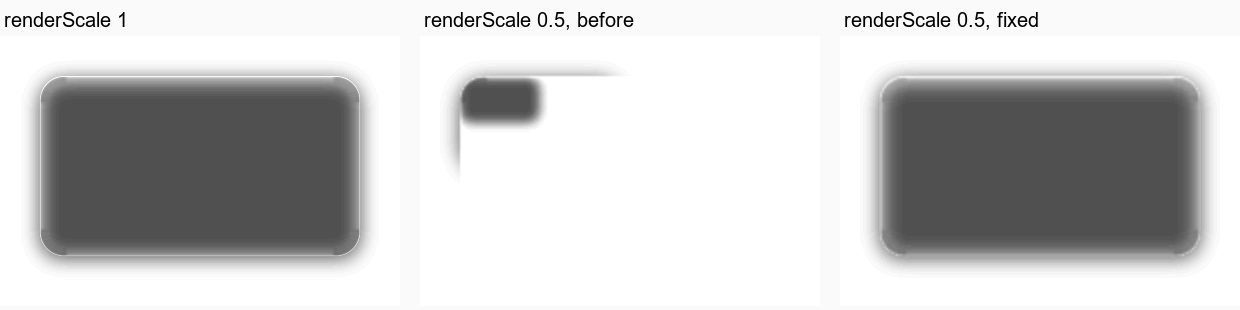
Desktop JVM test render (GlassContactShadowScaleTest): a clear 320 x 180 dp panel over a white
page, contrast stretched 5x so the 35-level shadow shows. Branch claude/parity-2 after c8c894d.
Measured on a Pixel 7, Android 17, scrolling the sample's Material screen — a list of glass cards over a backdrop that does not scroll, which is the expensive arrangement:
| Full resolution | renderScale = 0.7 |
|
|---|---|---|
| Janky frames | 8.9% | 4.3% |
| 50th percentile | 26 ms | 16 ms |
| 90th percentile | 73 ms | 18 ms |
| 95th percentile | 85 ms | 27 ms |
That is roughly twice the frame budget back. What it costs is the thing this material is best at. Measured across a panel's rim on the same device, the steepest luminance step the rim carries falls by about half: 61 to 26, 38 to 20, 77 to 53 on successive rows. The panel's own outline is unaffected, because that is geometry rather than refracted detail, but the compressed image of the surroundings that makes the edge read as glass gets softer.
On a Pixel 7 at 90 Hz (17 October; the Phone comparison scene, a bar, its selector and the search
button) the glass is not the bottleneck: per frame the UI thread takes 6.9 ms, the RenderThread 1.9 ms
and the GPU 8.5 ms at p50, all under the 11.1 ms budget, and renderScale 0.5 lowers GPU time only from
9 to 8 ms (device record).
On 18 October the same gesture script on the build with the dark lens's wider raw blur (0.5 at 50 dp)
read frame time p50 17-18 ms, p90 26 ms, GPU p50 9 ms and p90 15 ms (13 before), 1.9-2.0% janky (two
runs after a warm-up run).
The scrolling Material screen above is the expensive arrangement; there, resolution matters.
So the default is 1, and it should stay 1 unless a screen is actually missing frames. If it is, 0.7 is the value to try first: it halves the pixel count, and on a busy screen the rim detail it gives up is competing with everything else for attention anyway. Below about 0.5 the rim stops reading as a lens at all.
Two phones, six measured panels
The sample's Calibration screen with its six measured panels (a pill, four round buttons and
the toolbar capsule) re-rendering every frame at full resolution, the tint sweeping so that
every frame is new, from dumpsys gfxinfo over ten seconds:
| Device | median | 90th | 99th | GPU median |
|---|---|---|---|---|
| Pixel 7, 1080x2400, Android 15 | 19 ms | 31 ms | 44 ms | 10 ms |
| Galaxy S24+, 1440x3120, Android 16 | 17 ms | 28 ms | 38 ms | 7 ms |
Neither holds 60 Hz with six full-resolution panels on screen at once; both hold it with the one or two a real screen carries. The wide strip costs nothing measurable on either.
Where the time goes, from gfxinfo framestats on the S24+ (six panels, medians): 6.2 ms on
the UI thread (measure, layout and recording six glass layers, about 1 ms per panel), 0.1 ms
sync, 2.4 ms issuing draw commands on the render thread, 7.3 ms on the GPU (about 1.2 ms per
panel), the rest waiting for vsync. Without the wide strip: 6.4 / 1.2 / 7.2 ms — the strip is
inside the noise. The real Vitals screen, scrolled by flings: 9.9 ms vsync to completion, 3.1
ms UI thread, 3.8 ms GPU.
The first candidate for that UI-thread time was the render effects: each panel bound some fifty
uniforms and built a new effect every frame. They are now cached and rebuilt only when their
inputs change (GlassEffectCache), which on a scrolling screen is never. It moved nothing
measurable: six panels 6.2 ms on the UI thread before and after (the sweep changes the tint
every frame, so that scene never hits the cache by design), Vitals scrolled 2.9 ms before and
2.9 after, 10.3 ms vsync to completion against 9.9 (tools/framestats.py over
analysis/s24_framestats_*). So the cost is in recording the layers or in layout, not in the
effect objects; the next step is a system trace, and the candidate after it is one recorded
backdrop shared by every panel on screen instead of one per panel.
The wide kernel's strip
With the measured profile and wideKernel above 0, each panel records its padded backdrop a
second time at quarter scale under a Gaussian blur, into a strip beneath the sharp copy. That
is one extra record and one small blur per panel per frame; the shader then reads it with a
single bilinear tap. At a quarter of the padded area and a quarter of the sigma the blur is
cheap, but it scales with panel count like everything else here. Set wideKernel = 0.dp (and
fineShare = 1f) on a style to drop it, at the cost of the tone the phone shows.
The strip also brings the along-axis high-pass with it: five extra backdrop taps per pixel where
wideKernel is on. Five rather than seven because the pair at 2.25 sigma carries 5% of the
weight. Measured on an S24+ scrolling Vitals, 120 frames, with the directional kernel, the fused
outline and the retuned fringe all in: UI 1.8 ms, record 1.3, GPU 2.8, total 6.4, 2.2% janky
frames, against 10.3 total for the build before them. Not a like-for-like A/B — the two runs are
days apart on a device doing other things — but the material is not costing frames.
Measured on a Pixel 7 (1080x2400, renderScale = 1) with the sample's Calibration screen
sweeping Tint Amount so that all six measured panels re-render every frame: 19 ms median, 31 ms
at the 90th percentile, 44 ms at the 99th, GPU 10 ms median, and the same numbers with the strip
switched off. The strip is not where the time goes; six full-resolution panels are. Lower
renderScale before dropping the strip.
Where the rest goes: replacing the nineteen-tap scatter with five taps under 4 px, which is
where the measured fine kernel always is, took the median from 21 to 19 ms and the GPU median
from 12 to 10, so the per-pixel shader is about a tenth of the frame. The other nine tenths are
the per-panel layer records, the blur pass on each strip and the render-effect passes, which is
CPU and driver time rather than fill rate. That is the next thing to profile; the knob that
exists today is renderScale.
Render scale on a Pixel 7 (26 October)
A tab bar tap on a Pixel 7 at 90 Hz is GPU-bound at full resolution (GPU p50 12-14 ms against an 11.1 ms frame).
LiquidGlassTheme(renderScale = 0.75f) brings it to ~9 ms with no visible change at phone resolution; 0.5 to
~8 ms. Measurements and screenshots.