description: Liquid Glass for .NET on SkiaSharp: the painter, the iOS tab bar selector, and adapters for MAUI, WPF, Avalonia and Windows Forms.
Native .NET and Windows Forms
The experimental source adapter renders the production material on SkiaSharp without Compose,
JavaScript or a browser. It supplies a painter, a whole-surface interaction controller and a
Windows-specific control-backdrop helper. On NuGet from 0.2.1: LiquidGlass, LiquidGlass.WinForms,
LiquidGlass.Wpf and LiquidGlass.Avalonia; LiquidGlass.Maui from 1.0.0 (below).
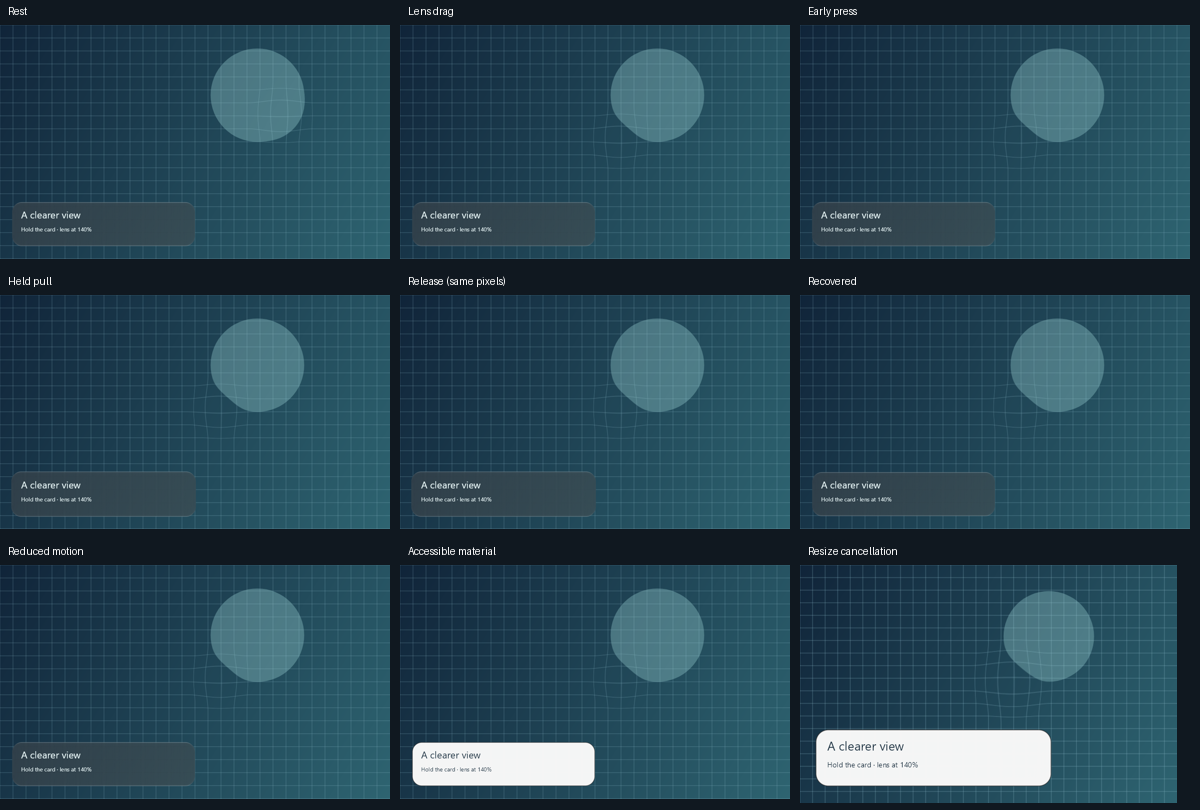
Nine app-owned CPU-rendered phases. Text and hit targets stay anchored. These are deterministic snapshots, not continuous timing or displayed-frame measurements.
Projects and prerequisites
| Project | Target / role |
|---|---|
ports/dotnet/LiquidGlass.Skia |
.NET 8; production painter, shader passes and framework-independent controller |
ports/dotnet/LiquidGlass.WinForms |
.NET 10/Windows 10 build 19041+; owned-control capture |
ports/dotnet/WinFormsDemo |
.NET 10/Windows; interactive lens/card and native-control examples |
ports/dotnet/Checks |
.NET 8; renderer, fixture, lifecycle and interaction verification |
ports/dotnet/LiquidGlass.Maui |
.NET 10; Android and Windows (not iOS); GlassSurface over your own MAUI views |
ports/dotnet/MauiDemo |
.NET 10 Android; glass card and bar over a scrolling page |
SkiaSharp is pinned to 4.153.1 with dependency locks. Linux rendering needs matching native assets, fontconfig and fonts. Windows Forms is Windows-only; other SkiaSharp host frameworks need their own native assets and lifecycle wiring. The painter embeds the exported production shaders at build time.
dotnet restore ports/dotnet/Checks/Checks.csproj --locked-mode
dotnet build ports/dotnet/Checks/Checks.csproj --no-restore
dotnet ports/dotnet/Checks/bin/Debug/net8.0/Checks.dll ports/dotnet/artifacts
dotnet restore ports/dotnet/WinFormsDemo/WinFormsDemo.csproj --locked-mode
dotnet run --project ports/dotnet/WinFormsDemo --no-restore
# Editable native controls and their glass preview:
dotnet run --project ports/dotnet/WinFormsDemo --no-restore -- --controls
The maintainer's private SDK/cache wrapper is tools/dotnet-port.ps1; it does not install an SDK.
.NET MAUI
LiquidGlass.Maui adds a GlassSurface view to .NET MAUI apps on Android and Windows. iOS and Mac
Catalyst are not targets: on iOS 26 the system draws Liquid Glass natively.
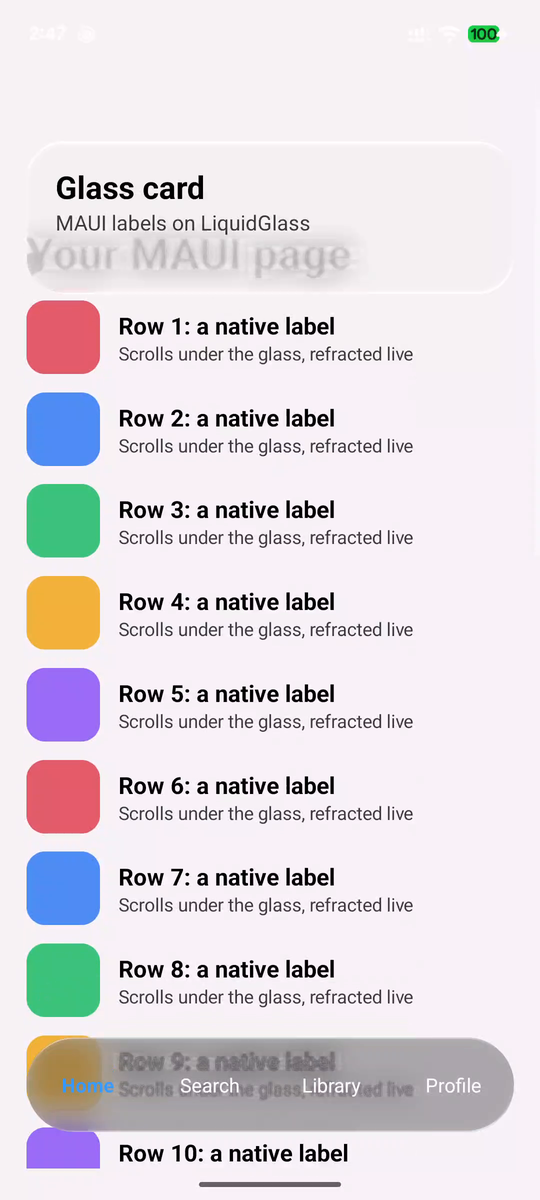
Our capture: ports/dotnet/MauiDemo (Release) on a Pixel 7, Android 17, a frame of
adb shell screenrecord mid-scroll, scaled to 50%. The page is 24 rows of native MAUI views.
Evidence.
builder.UseMauiApp<App>().UseLiquidGlass();             // MauiProgram.cs

var backdrop = new GlassBackdrop(rows, BackgroundColor); // the ScrollView's content
var bar = new GlassSurface { Backdrop = backdrop, Dark = true, Radius = 36, HeightRequest = 72, Content = tabs };
Content = new Grid { Children = { new ScrollView { Content = rows }, bar } };
GlassBackdrop draws the element's native view into a bitmap (Android View.Draw, WinUI
RenderTargetBitmap) once it is drawn and whenever its size changes; call RefreshAsync() after its
content changes. Glass follows it while it scrolls. It is a snapshot, so content animating on its own
shows its state at the last capture. GlassSurface takes Radius, Dark, TintAmount, Light,
Materialize, ReducedTransparency and IncreasedContrast. Verified on a Pixel 7; the Windows
target builds and packs in CI but has not been run. The
package README
has the details.
Painter contract
Create one painter per rendering thread/context, set its backdrop, and draw glass after the ordinary page. Device-pixel bounds use the backdrop's top-left coordinate system. Keep your labels and accessible native controls separate from the material drawing.
using LiquidGlass.Skia;
using SkiaSharp;

using var glass = new GlassPainter();
glass.SetSource(backdropImage); // borrows a live opaque sRGB SKImage
glass.DrawLens(canvas, SKRect.Create(360, 50, 180, 180), magnification: 1.4f);
glass.DrawSurface(canvas, SKRect.Create(30, 260, 300, 100), radius: 24,
    options: new(Dark: true, TintAmount: 50, Density: 1));
| API | Lifetime and behavior |
|---|---|
SetSource(SKImage) |
Borrows the image; keep it alive until replacement/disposal. Replacing invalidates the wide-tone cache. |
RecordBackdrop(width, height, drawPage, background) |
Owns a new host-drawing snapshot; a failed callback preserves the previous source. Exclude glass overlays. |
DrawLens(canvas, bounds, magnification) |
Continuous lens, magnification 1–2.5. At1 it preserves the source pixels. |
DrawSurface(canvas, bounds, radius/radii, options, feedback) |
Rounded material, optional per-corner radii and material-only feedback. |
GlassSurfaceOptions |
Dark/light, tint 0–100, positive density, materialize/reduced-transparency/contrast 0–1. |
GlassEffectPass |
Low-level material/content/endpoint shader compilation and strict named input binding. Caller owns returned shaders. |
Dispose() |
Releases owned GPU/native objects and owned snapshots; does not dispose borrowed images. |
Canvas state is restored. Recreate the painter and sources after GPU context loss. Current native host evidence is CPU-based; it does not verify arbitrary GPU hosts or wide-gamut/HDR conversion.
Calm interaction
CalmInteraction takes CalmGeometry in logical pixels, optional CalmOptions, and monotonic
timestamps in seconds. Pointer movement is cumulative displacement since down, never a delta.
var motion = new CalmInteraction(new CalmGeometry(300, 100, 24,
    X: 40, Y: 70, ViewportWidth: 800, ViewportHeight: 600));
motion.Press(seconds, dx, dy);
// On pointer-up, cancellation or lost capture:
motion.Release(seconds);
// In the host's render loop:
GlassFeedback feedback = motion.Sample(seconds);
glass.DrawSurface(canvas, deviceBounds, 24 * density,
    new GlassSurfaceOptions(Dark: true, Density: density), feedback);
GlassFeedback contains matrix A/B/C/D, logical offset, press amount, held state and Active.
Schedule another animation frame only while active; new input must wake an idle hold. The host
owns pointer arbitration and calls release when scrolling or another gesture cancels it.
Resize cancels old coordinates. SetReducedMotion immediately clears deformation and ownership;
release the host capture too. Older queued sample timestamps do not rewind state; stale input throws.
Defaults are authored 3% maximum press scale and 2 logical pixels per edge. Adaptive large-surface pull stays restrained; optional area-preserving whole-bar pull shares the portable model. This is whole-surface feedback, not the navigation-selector travel controller.
Existing native controls
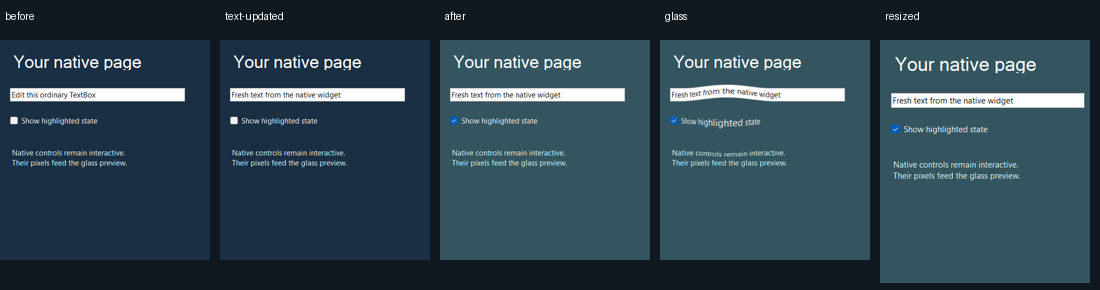
ControlBackdrop.Capture(backdropControl, opaqueBackground) returns a caller-owned opaque Skia
image from a visible, handle-created subtree on its UI thread. It includes borders, so its origin
is the root control's outer top-left. Pass that image to SetSource, then dispose the old image
only after successful replacement. Update after native content/layout changes; do not capture
again for every glass animation. Keep glass outside the captured subtree to avoid recursion.
Panel, Label, TextBox and CheckBox are verified. RichTextBox/ActiveX are explicitly rejected;
hidden children are omitted. Custom controls and overlapping container order require verification.
It calls DrawToBitmap, never a desktop screenshot API. See the
complete lifetime example and restrictions.
Reproduce native evidence
# Build first, then use fresh output directories:
dotnet build ports/dotnet/WinFormsDemo --no-restore
dotnet ports/dotnet/WinFormsDemo/bin/Debug/net10.0-windows10.0.19041.0/WinFormsDemo.dll --capture motion-proof
dotnet ports/dotnet/WinFormsDemo/bin/Debug/net10.0-windows10.0.19041.0/WinFormsDemo.dll --controls --capture controls-proof
node ports/dotnet/generate-motion-fixtures.mjs --check
Check the process exit code and verification JSON, inspect the images, and retain any failed run. Native capture invokes only its own handlers. Current checks, source hashes and open scope.