description: Liquid Glass for React Native on Android and the web: GlassSurface and GlassLens on React Native Skia with the production shaders.
React Native
@shayxo.dev/liquidglass-react-native draws Liquid Glass in React Native with
React Native Skia, using the library's production
shaders: the SkSL the Compose library runs, measured against iOS recordings. It targets Android and
React Native Web. iOS is not a target; on iOS 26 the system's own glass is the native choice.
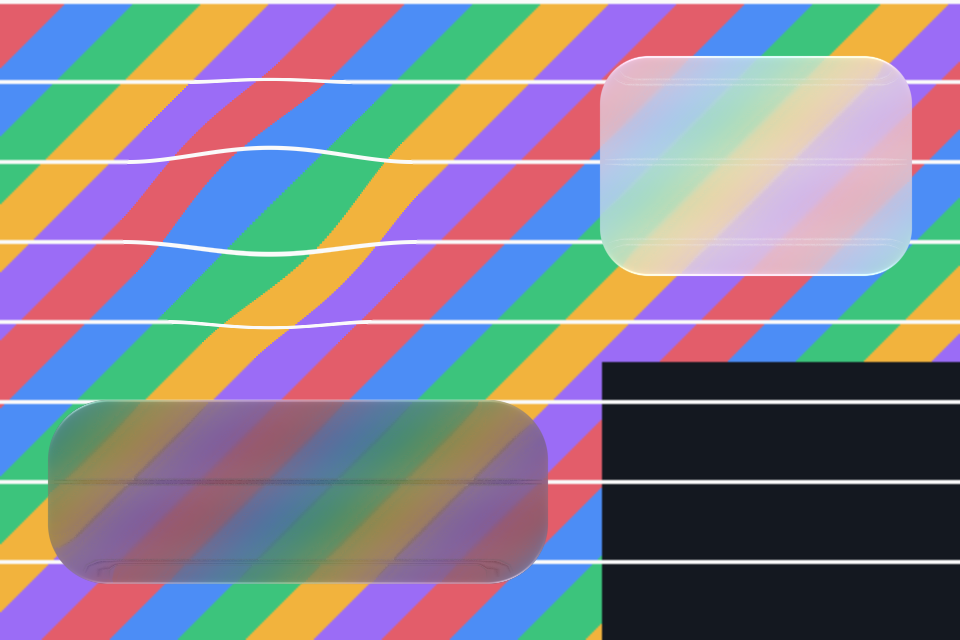
Our render: React Native Skia 2.14.0 headless (its JSI API over CanvasKit, software), pixel ratio 2. The demo app also runs on a Pixel 7 and the Android 17 emulator (evidence).
import {Canvas, makeImageFromView} from '@shopify/react-native-skia';
import {GlassSurface, GlassLens} from '@shayxo.dev/liquidglass-react-native';

const [backdrop, setBackdrop] = useState(null);
useEffect(() => { makeImageFromView(pageRef).then(setBackdrop); }, []);

<View ref={pageRef} collapsable={false}>{/* the page */}</View>
<Canvas style={StyleSheet.absoluteFill} pointerEvents="none">
  <GlassSurface source={backdrop} x={16} y={height - 100} width={width - 32} height={84} radius={28} dark />
  <GlassLens source={backdrop} x={40} y={120} width={140} magnification={1.5} />
</Canvas>
source is an opaque image of what is behind the glass (give the captured view a background), at
device resolution, its top-left at the canvas's origin; positions and sizes are in the canvas's units. GlassSurface takes the material's options:
radius;dark,tintAmountandtint;light([0, -1]is iOS 27's overhead light);- the accessibility settings (
reducedTransparency,increasedContrast).
GlassLens takes magnification. For the navigation bar and its selector, createGlassPainter() and
recordGlass() expose the full painter. The package README
has every prop.
How it is checked
The painter in ports/skia is written against CanvasKit, and React Native Skia's API is nearly the
same. A small adapter covers the differences: dispose() in place of delete(), numeric enums, matrix
objects and offscreen surfaces. The painter and shaders run unchanged.
In React Native Skia's headless build, the glass drawn through the adapter equals the glass drawn on CanvasKit directly, with no channel off by more than 1. The components also render inside a React Native Skia tree. Evidence.
Limits
- Run on one phone (Pixel 7) and the Android emulator; inspected by eye there.
- The backdrop is a snapshot: capture it again when the page changes.
- No touch response yet. The press and pull motion exists in the painter's controllers, but these components do not use it.