Shapes
The material's whole optical model runs off a signed distance field: distance from the rim drives the refraction band, and the field's gradient is the surface normal. So the question "what shapes are supported" is really "what shapes can we get a distance field for", and there are two answers.
Shapes with a closed form
Evaluated directly in the shader, exactly, at no extra cost.
Modifier.glassEffect(Glass.Regular, RoundedCornerShape(28.dp))
Modifier.glassEffect(Glass.Clear, CircleShape)                     // capsule or circle
Modifier.glassEffect(Glass(GlassStyle.Thick), RectangleShape)
Modifier.glassEffect()                                             // CapsuleShape by default
CircleShape needs no special handling — it is RoundedCornerShape(50%), so a circle and a
capsule are both just rounded rectangles whose radius happens to reach the short edge.
CapsuleShape, glassEffect's default as in SwiftUI, is the same RoundedCornerShape(percent = 50).
Squircles
Apple's shapes are squircles. RoundedCornerShape draws a circular arc, which meets the
straight edge with a visible change in curvature — the corner "starts" somewhere. A superellipse
corner blends into the edge continuously.
The difference is small, constant, and exactly where the eye checks.
val shape = GlassSquircleShape(cornerRadius = 28.dp, power = 4f)

Box(
    Modifier
        .clip(shape)                                    // the clip
        .glassEffect(Glass.Regular, shape)              // and the material agree
)
Passing the shape to glassEffect is enough — the material reads the exponent off it, so the
distance field and the clip describe the same outline. power = 2 is identical to
RoundedCornerShape; power = 4 is Apple's squircle; higher goes toward a rectangle with
rounded nubs.
GlassSquircleShape is an ordinary Shape, so it works for clip, background, border and
anything else that takes one.
There is also
GlassStyle.cornerPower, which sets the material's corner exponent independently. It exists for the case where you cannot change the clip. Prefer the shape: if the two disagree, the corner reads slightly fuller than the outline it is clipped to.
Arbitrary paths
Anything else — a star, a blob, a hand-drawn GenericShape — has no closed-form distance field.
The library measures it rather than refusing it.
Nothing else is required; the shape being a path is detected and handled. What happens under it:
- The outline is rasterised into the padded layer, once.
- An exact Euclidean distance transform runs over the result.
- The field is encoded into a texture and bound as a second shader input.
- The shader reads the measurement instead of evaluating a formula.
It is rebuilt when the shape, whole-pixel unpadded size, recorded padding, band, density or layout
direction changes. Size is rounded to the nearest layout pixel. Padding is already snapped by
recordPad to the rendering grid (ceil(pad * renderScale) / renderScale) and is preserved exactly
in both the cache key and field construction. For an authored example with renderScale = 0.75
and a 22.1 px padding requirement, recordPad derives 22.666667 px in layer coordinates.
Rounding that again would
move the field away from the shader's sampling origin. Style changes within a recording-grid
bucket reuse the field; crossing a bucket boundary rebuilds it.
Stable geometry is reused across scroll and press updates. Remember identity-based custom shapes;
creating a new shape instance on every recomposition can invalidate the field unnecessarily.
The cache-key correction is illustrated below: changing size and padding while keeping the same padded dimensions produces the fresh reference field.
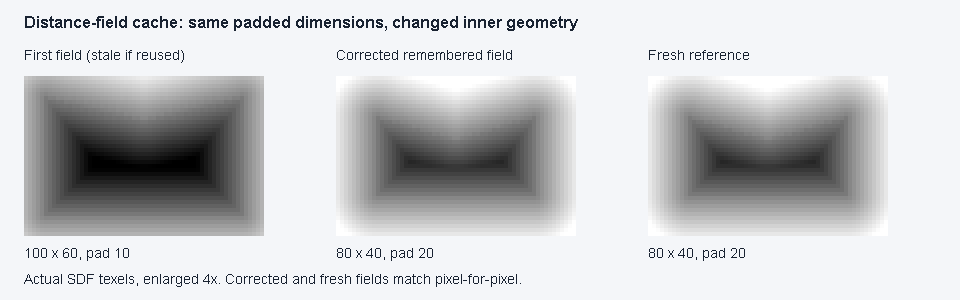
Desktop Skia field texels from the candidate based on 4cd5ed8, enlarged 4×; corrected/reference
pixels match exactly. This is a field diagnostic, not an app or device capture.
Method and verification.
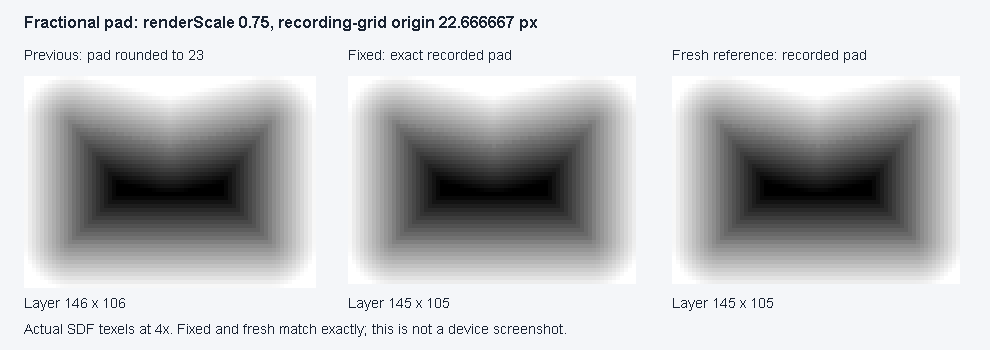
Desktop Skia field diagnostic from 46bbfc1, generated by the opt-in
CacheFieldVisualTest.renderFractionalPaddingOrigin harness: previous double rounding,
corrected remembered field and fresh reference, enlarged 4×. Corrected/reference texels match
exactly. This is not a physical device capture.
What it costs, and what it costs you
The transform's cost grows with the padded pixel area: a large field can take tens of milliseconds even on a desktop CPU (44-49 ms at 1080 × 720 px in the JVM probe; not a device frame-time measurement). Where it runs depends on what changed:
- The first field, and a change of shape, padding, band, density or layout direction are built during composition, before the frame that needs them. The previous field would be the wrong outline or sit at the wrong origin, so no frame is drawn with it, nor with no field at all.
- A change of size alone (a resize or a size animation) is built on a background dispatcher
(
Dispatchers.Default). Until it is ready the panel keeps drawing its previous field, which has the same origin but the old size, so the rim can lag the new edge for the frames the build takes. Resizes requested during a build collapse to the latest size, and a build still pending when the panel leaves composition is dropped. On the web (Wasm) the background dispatcher is the browser's single thread, so the build leaves composition but still runs on the main thread.
So a continuously animated path size no longer rebuilds inside every frame, but its rim follows the size a few frames behind. Animate the contents, use a closed-form shape, or measure whether that lag is acceptable for your animation.
Shader-incapable backends skip field construction; supported backends reuse a bounded shared transform workspace (a concurrent build uses its own temporary arrays). See performance for the measurements and retained-memory tradeoff.
Two encoding choices are worth knowing about, because they bound the quality:
- The mask and transform are computed at full padded resolution, preserving alignment with odd padding. The result is downsampled and stored at half resolution, with bilinear sampling.
- It is stored in eight bits over about one and a half refraction bands, which quantises distance to roughly a pixel. That is fine for the two questions the shader asks — how deep into the band a pixel is, and which way the surface faces — because it answers the second by differencing over a wide epsilon where a pixel of noise is nothing.
Sharp concave features (the inner points of a star) are the place to look if you want to see the limit. They are correct, but a pixel of quantisation is proportionally more visible there than on a long straight edge.
What is not supported
Stroked or open paths. The field is signed, which requires an inside. Close your path.
Shapes that change every frame. See above — the rebuild is not free. A morph between two closed-form shapes is much cheaper; see Interaction.